Creating Algorithmic Art Using Processing
Creating Algorithmic Art Using Processing Mar 8, 2010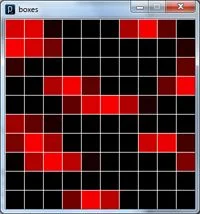
Still relevant since 2010: I’m glad you’re one of the thousands who find this post helpful. If you enjoy this article, I’d love for you to stick around and check out some of my more recent writing on technology, leadership, strategy, and AI. Explore recent posts →
Algorithmic Art - also known as Computational Art - is a form of expression that uses various algorithms and processing techniques to create visually aesthetic digital artwork in the form of still images, animations, and music.
Processing is an open source programming language and environment invented by Ben Fry and Casey Reyes from the MIT Media Lab that provides a way for anyone to create algorithmic art. Even you! Simply download Processing and follow one of the introductory tutorials to get started.
Here is a piece of algorithmic art I created by extending one of the 2D Array Processing tutorial.
This is the code used to create the animation below. Just copy and paste into your Processing editor and run to get the same output.
Square[][] grid;

int numCols = 10;
int numRows = 10;


//Called at the initialization of the program.
void setup() {
  size(300, 300);
  grid = new Square[numCols][numRows];
  for (int x = 0; x < numCols; x++) {
    for (int y = 0; y < numRows; y++) {
      grid[x][y] = new Square(x * 30, y * 30, 30, 30, (x + y) * cos(y));
    }
  }
}


//The draw method acts like the main method
public void draw() {
  background(255); // white
  for (int x = 0; x < numCols; x++) {
    for (int y = 0; y < numRows; y++) {
      grid[x][y].oscillate();
      grid[x][y].display();
    }
  }
}

//This class will handle the information about a square to be printed on the screen.
public class Square {
  private float x, y, w, h; // (x,y) width and height
  private float angle = 127; // brightness

  public Square(float xPos, float yPos, float boxWidth, float boxHeight,
  float sAngle) {
    this.x = xPos;
    this.y = yPos;
    this.w = boxWidth;
    this.h = boxHeight;
    this.angle = sAngle;
  }

  public void setPosition(float xPos, float yPos) {
    this.x = xPos;
    this.y = yPos;
  }

  public void oscillate() {
    angle += 0.1;
  }

  public void display() {
    stroke(255);
    fill(250 * sin(angle), 0, 0);
    rect(x, y, w, h);
  }
}
And here it is! My first piece of algorithmic art. Not much to it, but at least it does something moderately interesting.
The interactive animation has been lost to time — the code below shows how it worked.
Personally, I find algorithmic art very interesting. Simply because it takes something I'm comfortable with (programming) and fuses it with something I'm horrible at (art). If you decide to try out Processing, be sure to send me a link to it. I'd love to check it out.
If you found this helpful…
I’ve spent the last decade moving from hands-on engineering to executive leadership, and I write about that journey.
If creative problem-solving and the intersection of technology and creativity interest you, you might enjoy my writing on:
- Chess Not Checkers - Strategic, creative thinking
- The Simplicity Paradox - Finding elegance in complexity
Want insights on technology strategy and engineering leadership? Subscribe for updates →