How to Drastically Reduce Your PowerPoint File Size
**Still relevant since 2016:** I'm glad you're one of the thousands who find this post helpful. If you enjoy this article, I'd love for you to stick...
Still relevant since 2016: I’m glad you’re one of the thousands who find this post helpful. If you enjoy this article, I’d love for you to stick around and check out some of my more recent writing on technology, leadership, strategy, and AI. Explore recent posts →
I just tried to email a PowerPoint I was working on to a colleague for some feedback and realized, to my horror, that the file size was over 80MB. Obviously, that won’t do.
After digging around, I came to the conclusion that the massive amount of images I was using in the file had to be the issue. Going through and manually resizing each image seemed like too much of a chore though, certainly there had to be a better way. Luckily, there is!
In PowerPoint 2016 for Mac do the following:
- Click on an image - any image will do
- Select "Picture Format"
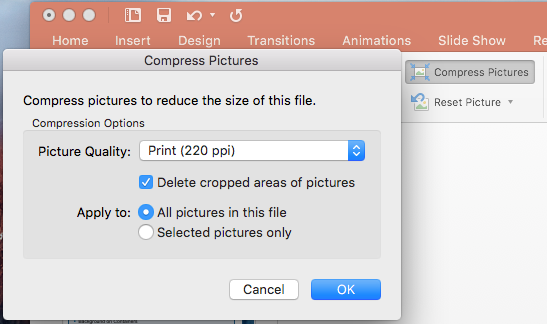
- Select "Compress Pictures"
- Select the picture quality from the dropdown
- Ensure "Delete cropped areas of pictures" is selected
- Choose to perform this action on the selected image(s) or all of them
- Click OK
And there you have it. After doing this one simple step, my file size went from over 80MB to around 7MB. Not too shabby.
If you found this helpful…
I’ve spent the last decade moving from hands-on engineering to executive leadership, and I write about that journey.
If effective communication and leadership matter to you, you might enjoy my writing on:
- Effective Leadership Through Effective Relationships - Communication fundamentals
- Read Fiction and Be a Better Leader - Developing communication skills
- The Five Year Cliff - Moving into leadership roles
Want insights on technology strategy and engineering leadership? Subscribe for updates →
How did you like this article?
Enjoyed this article? Subscribe to get weekly insights on AI, technology strategy, and leadership. Completely free.
Subscribe for Free